
LOCAL LLM DEPLOYMENT GUIDE
What to Know Before Running a Local LLM
on a GPU Server
Seven key points to understand before deployment: architecture, use cases, configuration, and validation.
Inquiries about using local LLMs are increasing. The goals vary: handling data that cannot be sent to the cloud, enabling search over internal documents, running inference on-site.
Here we organize seven key points to understand before deployment—from the basics of local LLMs to GPU configuration thinking, document search design, and validation approaches.

* This article uses IMMERSIA EDGE as a reference example. Actual configurations and performance vary by use case and environment.
01
What is a local LLM and why is it gaining attention?
A local LLM is a large language model that runs on your own server or PC without connecting to the internet. Unlike cloud-based AI such as ChatGPT, input data is never sent to external servers, making it suitable for workflows that handle confidential information.
In recent years, open-source LLMs have improved rapidly in capability, and they are now being evaluated as practical options in research institutions, healthcare, and manufacturing—environments where sending data outside the organization is restricted.
However, running a local LLM requires GPU memory and compute power proportional to the model size. Clarifying "which model, for which purpose" is the starting point for selecting the right configuration.
02
What tasks can it handle?
Local LLMs are particularly effective for knowledge-retrieval tasks that recur in daily work: searching and summarizing internal documents, organizing meeting minutes, answering questions about technical materials, and completing or reviewing code.
In research institutions they are used for Q&A over papers and lab notebooks, assisting with data analysis, and drafting reports. In healthcare and manufacturing, use cases for manual search and procedure verification are growing.
On the other hand, they are not suited for high-precision numerical computation, real-time control, or automated legal judgment—tasks where errors cannot be tolerated. Designing the system so that "AI assists, humans decide" is essential.
03
Cloud vs. local: understanding the difference
Cloud LLMs let you access the latest models without upfront investment, but input data is sent to external servers. Depending on terms of service and information-security requirements, this may pose constraints.
Local LLMs keep data within your own environment, making them easier to apply to confidential workflows. However, you are responsible for procuring, installing, and operating the server.
Which is appropriate depends on the nature of the data, required response speed, cost, and operational capacity. A phased approach—"try it in the cloud first, then move confidential data to local"—is also a valid option.
04
GPU selection goes beyond card count
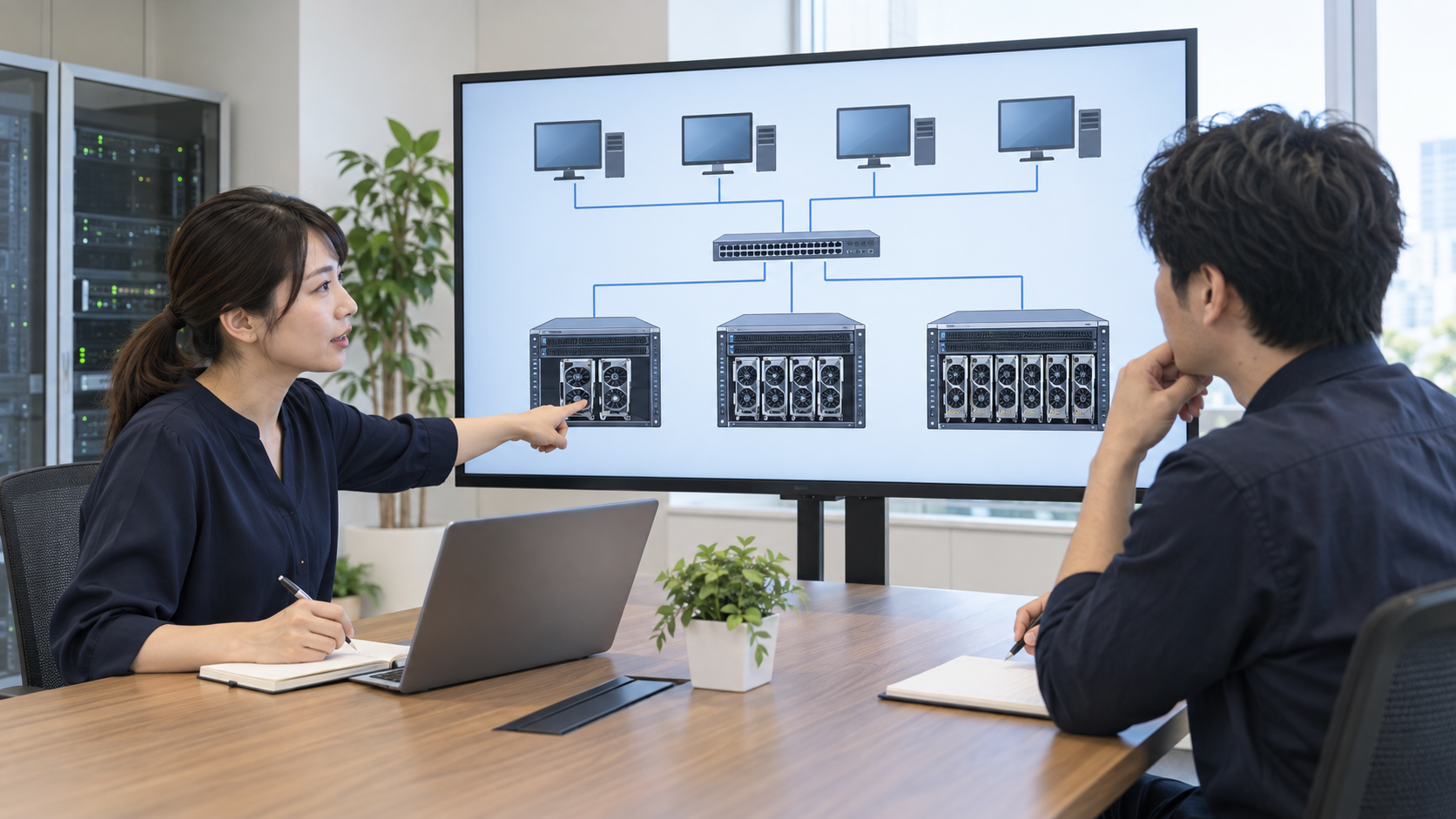
Local LLM performance depends not only on the number of GPUs but also on per-card memory (VRAM) and the interconnect bandwidth between cards. Running large models requires distributing them across multiple GPUs, and inter-GPU communication speed can become a bottleneck.
As the number of concurrent users increases, so do the required memory and compute. The configuration needed for "one person running inference" differs significantly from "ten people running inference simultaneously."
The number of servers and their interconnect topology also vary by use case. Whether to keep everything on one server or distribute across multiple depends on the balance of throughput, availability, and budget. We recommend first clarifying the intended use and scale, then evaluating configurations accordingly.
05
Document search requires more than just a GPU

The approach of using a local LLM to search and answer questions from internal documents is called RAG (Retrieval-Augmented Generation). Before the LLM generates a response, relevant documents are retrieved and provided as context, enabling grounded answers.
Implementing RAG requires document vectorization, index construction, and search-engine design. These depend not only on GPU performance but also on storage speed, CPU capacity, and software architecture.
"Add more GPUs and document search just works" is an oversimplification. It is important to clarify the type, volume, update frequency, and quality requirements of your documents before designing the overall system.
06
Limitations of local LLMs and setting realistic expectations
Local LLMs can generate incorrect answers (hallucinations) for recent information not in their training data or for highly specialized domain knowledge. An operational design that requires human verification of responses is essential.
Also, a larger model is not necessarily more capable for your use case. Selecting a model suited to the task and validating it with actual business data leads to higher satisfaction after deployment.
Expecting that "deployment will automate our workflows" is currently unrealistic. We recommend designing business processes with the premise that AI assists and humans judge and verify.
07
Validate small, then finalize the configuration

Deploying a local LLM does not require a large-scale configuration from the start. We recommend selecting one or two representative use cases and validating answer quality, response speed, and usability with a small-scale setup first.
Using validation results to determine the required GPU configuration, server count, storage, and network design reduces over-investment and post-deployment reconfiguration.
Installation conditions (power, space, weight, heat dissipation) must be confirmed in parallel with the GPU configuration. Rather than searching for an installation site after the configuration is finalized, identifying the constraints of the installation environment first and then narrowing down the configuration leads to a smoother deployment.
CONTACT
Discuss your local LLM configuration and installation requirements
Share what you know about your use case, model, installation site, number of GPUs under consideration, and target timeline. We welcome inquiries even before the configuration is finalized.
This article uses IMMERSIA EDGE as a reference example. The content is based on publicly available information, but actual performance, configuration, and installation feasibility vary by use case and environment. Always consult a specialist before deployment.
* Images in this article are AI-generated illustrations. They do not represent actual deployment sites, employees, physical products, or verified results.
Read Next
AI Infrastructure for Research & Universities
Building AI platforms for research environments handling confidential data.

Private AI: Building an On-Premises AI Infrastructure
How to build an on-premises AI platform that operates without external connectivity.
GPU Configuration Guide by Use Case
Configuration approaches for local LLM, document search, and image analysis workloads.
Consult on GPU Count & Server Configuration
We will review GPU count, server count, and network configuration based on your use case and user volume.
Consult on GPU Count & Server ConfigurationYou will be directed to the WOODMAN official contact form.